Add content
Upload your images and videos, or build your own scene in the studio.


Two Signage is a cloud-based digital signage system. Arrange content on a timeline, plan the day and send it to your screens.
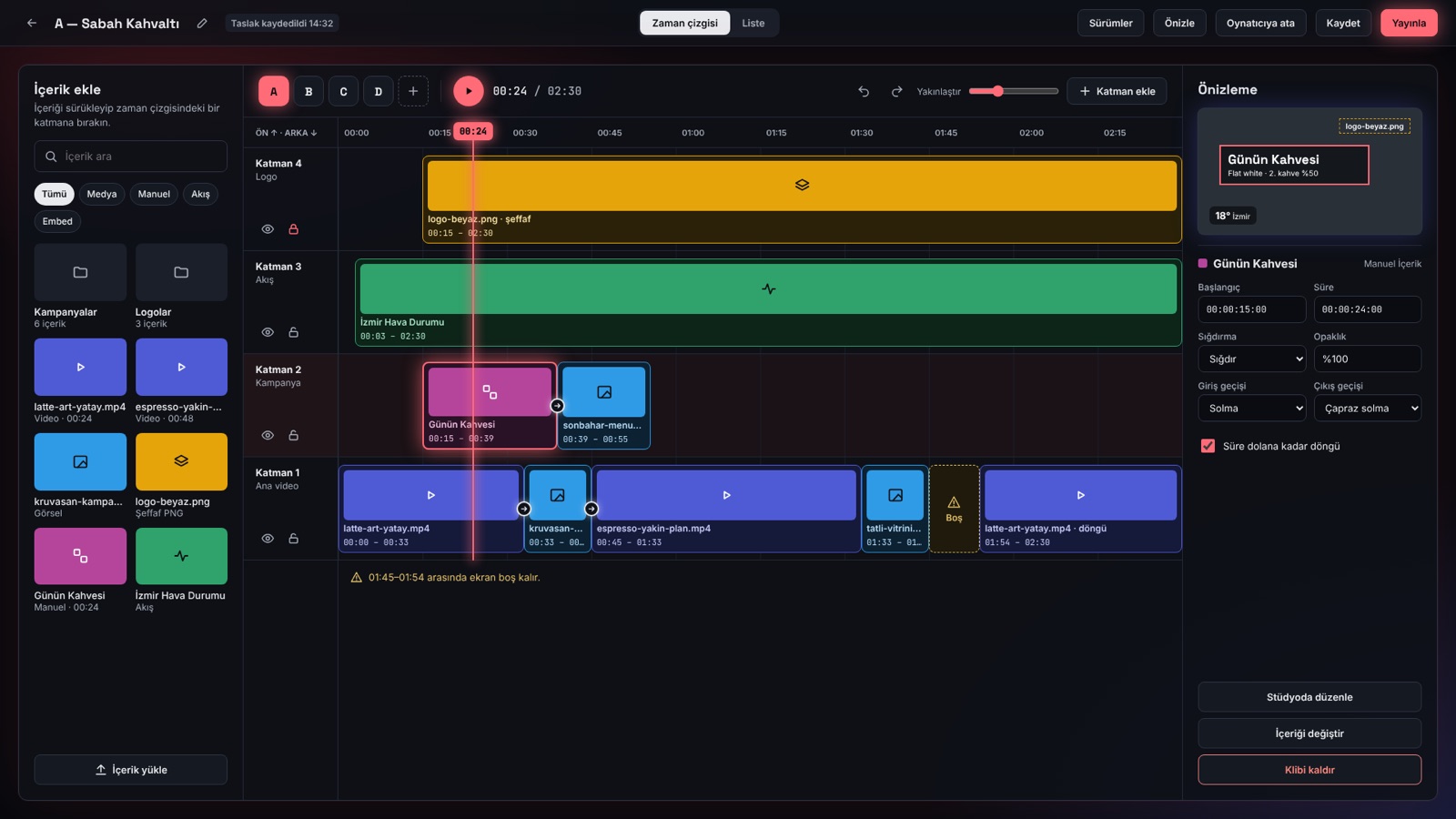
Upload your images and videos, or build your own scene in the studio.
Put content in order, set durations and transitions, and preview.
Publish; screens pick up the new content on their own and play it full screen.
From creating content to monitoring screens, everything is in the same panel.
Stack images, videos and feeds in layers; adjust durations, transitions and layout while watching the preview.
Design your own scenes with text, images, shapes and QR codes; start from ready-made templates.
Clock, weather, exchange rates, news headlines and meal menus update on their own.
Plan what plays when with a weekly schedule and special days.
See which screens are online; refresh them remotely, push instant content, pair with a code.
Use several screens as one surface; content is split across them and plays in sync.
Set up rules such as "blank the screens at 23:00" or "send an e-mail if a screen goes offline".
Six roles: you decide who uploads, who publishes and who can only view.
See what played on which screen and when, and export the records.
Define your colours, fonts and logo once; feeds, scene layouts and animated backgrounds open in your brand.
Have it write scene copy, read a meal-menu PDF, or answer questions about your workspace. Nothing is applied until you approve it.
Content goes through an approver before it reaches the screens; roll back to an earlier version when needed.
The player runs in a browser and on Android; other packaged apps are on the way.
From a single screen to multi-branch networks, the same panel.
Send campaigns to in-store screens right on time.
Update menu boards and the dish of the day from one place.
Show announcements, meal menus and events on campus screens.
Show information and wayfinding content in waiting areas.
Share company news and dashboards on office screens.
Show up-to-date information on stop and terminal screens.
The player is a web page: it runs full screen on any display with an up-to-date browser. The Android app is on the download page; apps for webOS, macOS and Windows are in preparation.
The screen keeps the last playlist it received and continues playing it until the connection returns.
JPEG and PNG images, and MP4 videos encoded with H.264.
You can connect your own Google Drive account to your workspace; files are kept there, only in the folder Two Signage creates.
Accounts are created by the workspace administrator; there is no public sign-up. Contact us to try it.
Pricing has not been announced yet. Tell us how many screens you have and we will get back to you.
Tell us how many screens you have and what you want to show; we will get back to you and set up a trial account.
info@twosignage.com